
iPhone Housing (Frame)
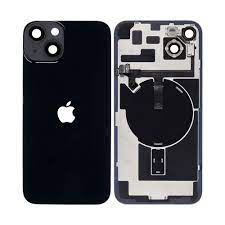
Replacement Case for iPhone
If your iPhone needs to have its housing or cover replaced, it's critical to make sure you use a high-quality replacement part and have the work done by a qualified service provider with experience fixing iPhones, such as IRepair center. The steps to changing the iPhone housing are as follows:
- Make a backup of your data: In order to guard against data loss, it's crucial to do this before starting any iPhone repairs.
- Invest in a premium replacement housing: You can buy a replacement housing from a reliable vendor or online. Verify that the housing fits the model of your iPhone.
- Assemble the required tools: To remove your iPhone and change the housing, you'll need a set of precision screwdrivers, a spudger, and a plastic pry tool.
- Disassemble your iPhone: To disassemble your iPhone and take out the old housing, refer to a manual or tutorial. Take care to prevent any internal component damage.
- Install the new housing: Reassemble your iPhone after carefully installing the new housing, being sure to connect all of the wires and parts correctly.
- Test your iPhone: Check that your iPhone is functioning properly by testing it when the repair is finished.
Common iPhone Frame / Housing Problems
- Bent Case / Frame / Housing
- Damage Case / Frame / Housing
- Crack Case / Frame / Housing
- On/Off Button stuck due to dent or bent
- Volume button stuck due to dent of bent
It’s important to note that replacing the iPhone housing requires advanced repair skills, and it can be difficult to do it yourself. If you’re not confident in your ability to perform the repair, it’s best to seek professional assistance from a reputable service provider like IRepair Kathmandu center.